Amy's Wandering

Wandering through life one season at a time

  • Home
  • {Start Here}
  • {Funschool}
    • Mad Libs
  • {Nature Notebook}
  • {Printables}
  • {Homeschool for FREE}
    • Free Curriculum Links
    • Create Your Own Curriculum
  • {Curriculum}
    • Assignment Sheets

review – Sense & Sensibility patterns

September 1, 2009 By: amyswandering1 Comment

classfront1

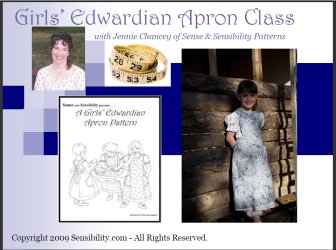
I stop by to admire the beautiful dresses at Sense & Sensibility Patterns from time to time. I like to look around and think about what it must have been like to wear feminine things like this and this. We eagerly signed up for a chance to try out the Girls’ Edwardian Apron eClass.

I was very impressed with the class. Pictures and audio take you step-by-step through the entire process. The terms are very basic – no advanced sewing jargon to try and figure out. Since my niece is schooling with us this year, I pulled my sewing sister in on this one. The end result is very cute. The pattern can even be scaled down to fit an American girl doll! Wouldn’t a little girl apron and matching doll apron be a precious Christmas gift?

The Nitty Gritty:

The eClass and pattern are $24.95, or you can download just the pattern for $7.95.

Things I Like:

  • the pattern doesn’t have to be stored – just print off another if you ever need it again
  • the lesson is great for a beginner sewer and doesn’t assume you already know the basics
  • it is so cute & girly!

Value: I think this is a good deal for a class and a pattern. Unlike a real-live class, this one can be reviewed over & over until each step is mastered.

See what my TOS Crew Mates have to say about Sense & Sensibility Patterns!

~~apron picture coming soon~~

Share this:

  • Click to share on Pinterest (Opens in new window)
  • Click to share on Facebook (Opens in new window)
  • Click to share on Twitter (Opens in new window)
  • Click to share on Reddit (Opens in new window)
  • Click to share on Tumblr (Opens in new window)
  • Click to share on LinkedIn (Opens in new window)
  • Click to share on Pocket (Opens in new window)
  • Click to email a link to a friend (Opens in new window)
  • Click to print (Opens in new window)

review- Web Design for Kids

September 1, 2009 By: amyswanderingcomment

WebDesignforKids

I am an html dunce. I can kind of follow basic tutorials to create buttons and gizmos for my blog, but I never really understood what I was doing or why it worked.

Enter Web Design for Kids (and Curious Grown-Ups!). It is a DVD that teaches html basics. It was a perfect fit for some like me! Brian Richardson assumes that the viewer knows nothing and even includes a lesson on File & Folder Management. Here a few of the subjects covered:

  • The 10 Basic Lines of Code
  • Coloring the Background and Letters
  • Making Letters Move Across the Screen
  • Designer Backgrounds
  • Changing Fonts
  • Adding Pictures

Funny Girl(12) and I watched the DVD while following along on the computer. In no time at all she had created a web page with a background, pictures, and scrolling text. I was thrilled to learn what some of the different abbreviations meant and how to change an existing code.

The Nitty Gritty:

There is a Summer Special price of $19.99 + $3.99 s&h for a limited time only.

Things I Like:

  • the ability to pause the DVD while we work on each step
  • detailed, but simple, instructions
  • lots of explanation – Brian would tell us to do something and just as I wondering why it was done that way, he would pop in and answer that very question
  • Click Drag Solutions supports several charities through the sale of this DVD

Value: I would definitely pay $19.99 for this product (not so sure about full price though). I have read pages of free tutorials on the web, but none of them presented html in a way that I could follow like this program does. (Ok, all you computer whizzes can quit snickering now 🙂


See what my TOS Crew Mates have to say about Web Design for Kids!


Share this:

  • Click to share on Pinterest (Opens in new window)
  • Click to share on Facebook (Opens in new window)
  • Click to share on Twitter (Opens in new window)
  • Click to share on Reddit (Opens in new window)
  • Click to share on Tumblr (Opens in new window)
  • Click to share on LinkedIn (Opens in new window)
  • Click to share on Pocket (Opens in new window)
  • Click to email a link to a friend (Opens in new window)
  • Click to print (Opens in new window)

review- Quarter Mile Math

August 28, 2009 By: amyswanderingcomment

quartermilemath

horse_car

It is the rare child who doesn’t like cars or horses, so combine them with a fun skill review game and we have a winner in The Quarter Mile Math!

We received the Deluxe version to test and it has been so much fun! Each person chooses a dragster to race or a horse to run through a meadow.  After choosing a topic, you try to correctly answer problems as fast as you can. Your five fastest horses or cars are always competing against each other, so the object is to top your previous best time. My 4 year old can even play along with the keyboard letter and number recognition categories.

I think this is so much more effective than flash cards. My kids are motivated to keep practicing the same multiplication problems in order to to beat their fastest time. I really appreciate how Barnum Software has made this cost effective for the majority of homeschoolers at $2.95 per month for the entire family!!

The Nitty Gritty:

The Quarter Mile Math comes in two different affordable versions. You can compare them on this chart.

Things I like:

  • fun for all ages, from preschoolers to adult
  • skills are very specific, not just a bunch of random problems
  • kids are motivated to improve on their best time
  • used by Sylvan Learning Centers
  • very affordable

Value: Dirt cheap is how I would price this one!  LOL  I know that this is not true for all, but most families will not miss $2.95 a month. You can also purchase a one or two year subscription, or the standard cd version.

Barnum Software is offering my readers $5 off of the Standard or Deluxe version if ordered by September 30th using this code: 7R7K7

See what my TOS Crew Mates had to say about The Quarter Mile Math.

Share this:

  • Click to share on Pinterest (Opens in new window)
  • Click to share on Facebook (Opens in new window)
  • Click to share on Twitter (Opens in new window)
  • Click to share on Reddit (Opens in new window)
  • Click to share on Tumblr (Opens in new window)
  • Click to share on LinkedIn (Opens in new window)
  • Click to share on Pocket (Opens in new window)
  • Click to email a link to a friend (Opens in new window)
  • Click to print (Opens in new window)

review – ALEKS math

August 26, 2009 By: amyswanderingcomment

The timing was perfect for our chance to review ALEKS Math! We were lagging a bit behind due to our new baby & recent move and this online Math program was just what we needed to get caught up.

ALEKS is a Research-Based Online Program:

  • Complete Curriculum Solution for Math with Access to Full Course Library
  • No Textbook Required
  • Artificial Intelligence Targets Gaps in Student Knowledge
  • Assessment and Individualized Learning for Grades 3-12
  • New and Improved Master Account – Includes Quizzing, Attendance Tracking, Automated Reports, and More
  • Unlimited Online Access – PC and Mac Compatible
  • QuickTables – Complimentary Math Fact Mastery Program for Multiplication, Division, Addition, and Subtraction

Assessment: Students begin in ALEKS by taking an individualized, adaptive assessment to determine what they already know and what they are ready to learn next.

Student MyPie
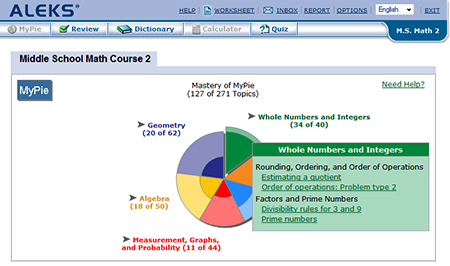
MyPie: The ALEKS Pie summarizes a student’s current knowledge and offers topics that the student is ready to learn next. The darkened portion of each pie slice represents the topics that the student has mastered and the lighter portion represents what the student has yet to learn.

Student Problem Two
Learning Mode: The Learning Mode provides students with practice problems, and offers explanations of topics and procedures as needed. Once a student has demonstrated mastery in the Learning Mode, the item is added to the ALEKS Pie, and new material that the student is now ready to learn becomes available.

Master Progress Report
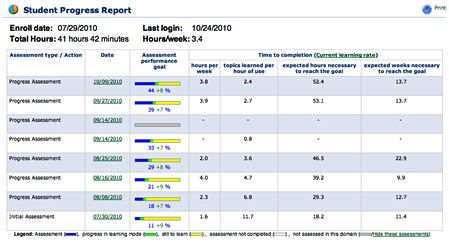
Student Progress Report: Track student progress made throughout the course. The blue bar represents the percent of course material that the student has mastered during an ALEKS assessment; the green bar represents the percent of new topics the student has mastered in Learning Mode since the last assessment; and the yellow bar represents the percent of topics the student has yet to learn in order to complete the course.

The Nitty Gritty:

A subscription to ALEKS is

  • $19.95 per student, per month, or
  • only $99.95 every 6 months, or
  • only $179.95 every 12 months.

Learn about the family discount program.

Things I Like:

  • The Learning Pie is a very motivating tool for my kids. They like seeing what they have mastered & what they still need to learn.
  • It is easy to keep track of progress for multiple kids.

Value: I think you definitely get your money’s worth if you just need ALEKS for a month or two – to play catch up like we did or for some tutoring. However, I think it is very pricey for a whole year. If I am going to invest a large amount of money, then I want something I can use year after year. Having said that, if you have a child who struggles with Math then it might be  worth it to you to finally find the program that clicks!

ALEKS is offering my readers a FREE 1-Month Trial. Just click the banner below to get started!
Visit ALEKS for 1-Month Trial

See what my TOS Crew Mates had to say about ALEKS Math!

Share this:

  • Click to share on Pinterest (Opens in new window)
  • Click to share on Facebook (Opens in new window)
  • Click to share on Twitter (Opens in new window)
  • Click to share on Reddit (Opens in new window)
  • Click to share on Tumblr (Opens in new window)
  • Click to share on LinkedIn (Opens in new window)
  • Click to share on Pocket (Opens in new window)
  • Click to email a link to a friend (Opens in new window)
  • Click to print (Opens in new window)

review – Grapevine Studies

August 19, 2009 By: amyswandering3 Comments

MOTBT L1NTS L3NTS

I’ve had my eye on Grapevine Studies for a couple of years now, so I was thrilled when I saw them on my review list! Dianna, the author of the series, went above and beyond to help me decide which studies were the best fit for my kids. I chose to review the Old Testament Basics and New Testament Overview Levels 1 & 3 e-books.

The concept is simple: draw basic stick figures for key stories in the Bible. The Teacher Book tells you step-by-step what to say and draw. Each lesson starts with a review, and then the teacher draws the lesson on a whiteboard as the student follows along on paper. It is that easy!! But don’t let the simplicity fool you – my kids are absorbing Bible facts like little sponges.

My husband is leading us through this before bed each night and the kids really enjoy it! My 4 year old needs a little guidance, but she is having no problem understanding and keeping up with the others. Everyone wants a turn with the dry erase markers, so Hubby quizzes each kid at the end of the lesson and they get to draw (and then erase!) the answer.

The Nitty Gritty:

  • OT Basics Teacher e-book  19.95
  • OT Basics Student e-book  19.95
  • NT Overview Teacher 3-4 e-book  24.95
  • NT Overview Student 1  e-book 25.95
  • NT Overview Student 3  e-book 22.95

Things I Like:

  • very easy to use – just open & teach
  • fun for the whole family
  • great customer service

Value: I think these are worth the money, especially if you buy the e-books. My 4 kids are sharing two levels, and I can cycle back through them when the two little ones & the baby get older.

I have a special discount to share with my readers. Order by September 15th and get 30% off with this code: crews

Go see what my TOS Crew Mates had to say about Grapevine Studies!

Share this:

  • Click to share on Pinterest (Opens in new window)
  • Click to share on Facebook (Opens in new window)
  • Click to share on Twitter (Opens in new window)
  • Click to share on Reddit (Opens in new window)
  • Click to share on Tumblr (Opens in new window)
  • Click to share on LinkedIn (Opens in new window)
  • Click to share on Pocket (Opens in new window)
  • Click to email a link to a friend (Opens in new window)
  • Click to print (Opens in new window)
  • « Previous Page
  • 1
  • …
  • 15
  • 16
  • 17
  • 18
  • Next Page »

welcome

apple-FBapple Pinapple IG

Back to School Subscribe

Categories

Recent Comments

  • marydonnaleelong on Homeschool for Free: Art
  • Amy Natzke on Roman History Printable Resources
  • Jessica on Homeschool for Free: Complete Curriculum
  • Brenda on Free Printable Reformation Resources
  • Jeni on Tips for Planning a Fundraiser Garage Sale

~Archives~

Be My Facebook Friend!

  • © Amy's Wandering, 2006-2021. Unauthorized use and/or duplication of this material without express and written permission from this blog’s author and owner is strictly prohibited. Links may be used, provided that full and clear credit is given to Amy's Wandering at amyswandering.com with appropriate and specific direction to the original content.
    May 2026
    S M T W T F S
     12
    3456789
    10111213141516
    17181920212223
    24252627282930
    31  
    « Nov    

    HSSeasonsFBnew

    Follow Amy T @ Are We There Yet?'s board Homeschool - Organize on Pinterest.
    Facebook

    Copyright © 2026 · Modern Blogger Pro Theme By, Pretty Darn Cute Design